High-End Custom Software
13412889989
ENTERPRISE AI ASSISTANT PLATFORM

Enterprise AI
Assistant Platform

Bring large-model chat, enterprise knowledge and business data into one workspace. A unified entry point, private knowledge base, data connections and analytics dashboards, with role-based permissions aligned to your organization and phased delivery built on existing systems.

Multi-model Chat Private Knowledge Base (RAG) Business System Data Integration Unified Identity & SSO Role-based Data Access
Data Source ConnectedERP / WMS integration status at a glance
Linked Private Knowledge BaseSearch scoped by department permissions
AI Assistant · Workspace Online
AI Chat Knowledge Base Data Integration Process Intelligence Business Analytics Administration R&D Management
Help me review this month's business performance
Enterprise AI Assistant
Retrieving business data and sales knowledge base
Filtering content by the current account's department permissions
Summarized this month's revenue, profit and order trends, and generated charts and metric commentary in the Business Analytics Dashboard. Ask follow-ups to drill into a specific product line or region.
Analyze this month's key metric movements Find related policy documents View process parameter recommendations
Ask about process, quality or business data…
OAU8PLMMESWMSFeishu System entry points and data integration scope can be configured to fit your environment
CAPABILITIES

One workspace covering six common scenarios

From chat and knowledge to data, analytics, R&D and organizational management, all modules share one account and permission system.

01 / DIALOGUE

Unified AI Chat

A unified chat interface with multi-model routing and switching, streaming responses, and saved conversation history. Choose a model by question type or let the system decide.

Multi-model SwitchingStreaming OutputChat History
02 / KNOWLEDGE

Private Enterprise Knowledge Base

Upload and parse PDF, Word, Excel and PPT documents. Content is chunked and vectorized for semantic search and retrieval-augmented answers in chat.

Multi-format ParsingVector SearchRAG Q&A
03 / DATA

Business Data Integration

Centrally configure API endpoints and authentication for ERP, WMS and other data sources, monitor status, and give analytics and chat a traceable data source.

Source ConfigurationAuthenticationConnection Status
04 / ANALYTICS

Business Analytics Dashboard

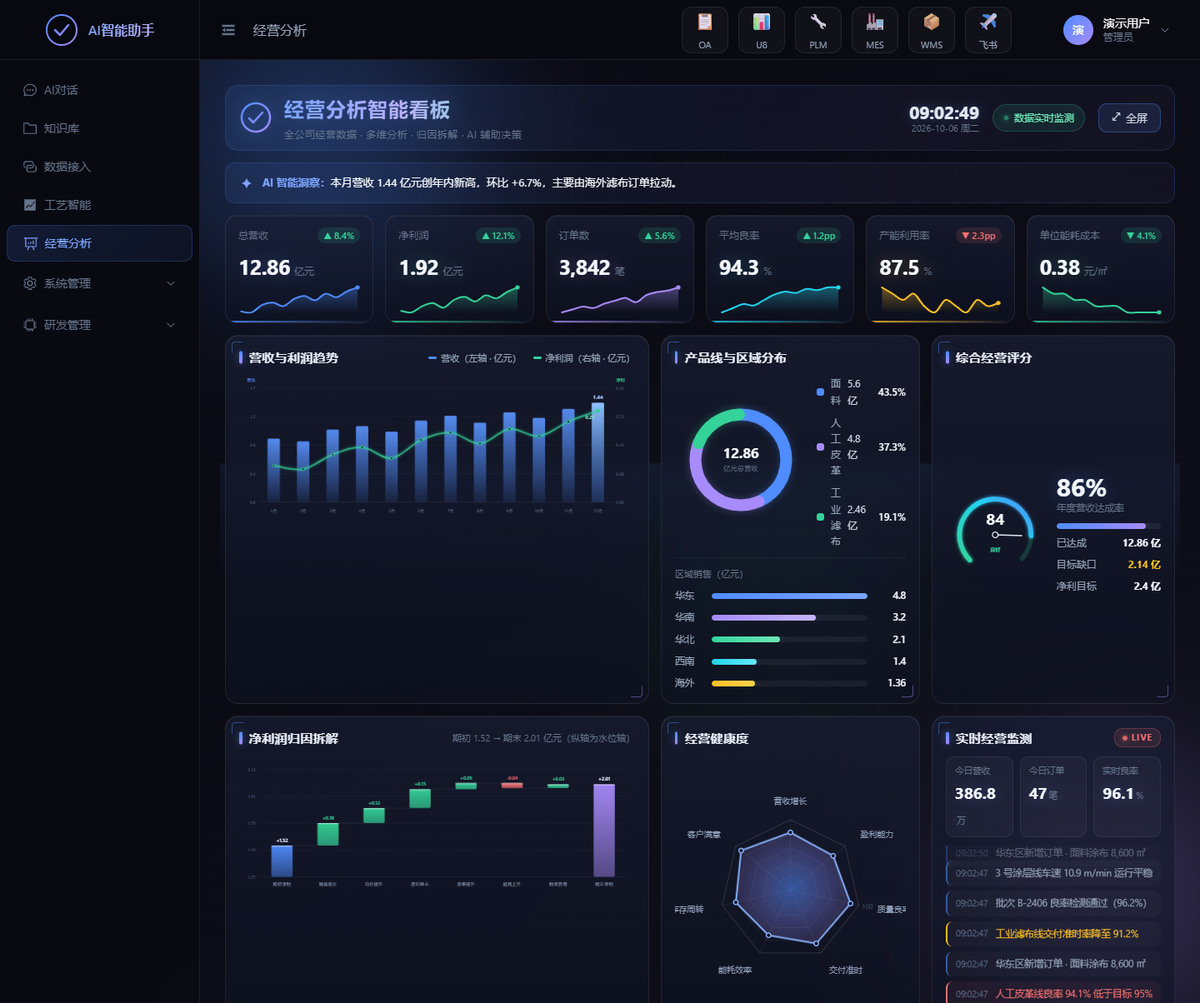
Aggregate revenue, profit, orders and capacity into trend and distribution charts, with AI insight prompts and a live monitoring area for a quick read on data changes.

Metric TrendsRegional DistributionInsight Prompts
05 / PROCESS

Process Intelligence

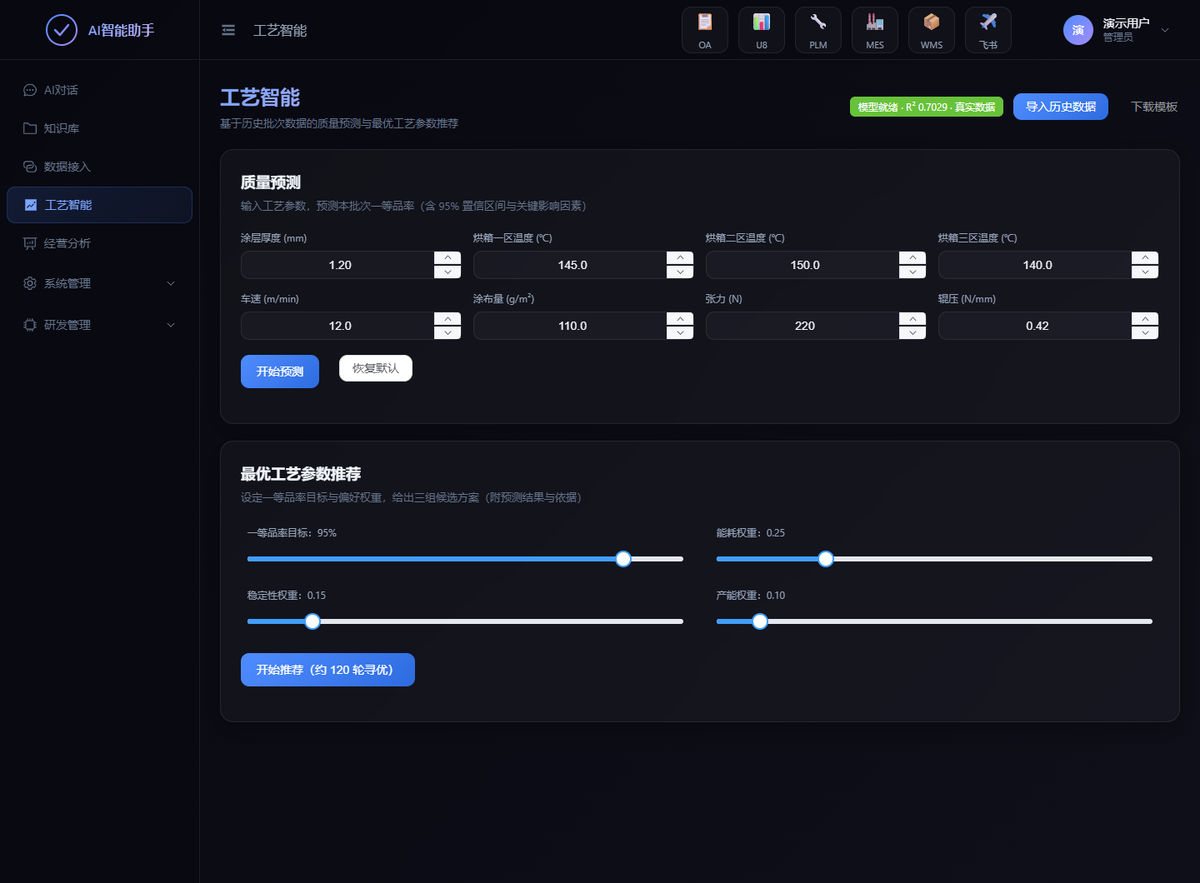
Enter coating thickness, temperature, line speed and other process parameters for quality prediction, then get parameter recommendations weighted by first-grade rate, energy use and stability.

Quality PredictionParameter RecommendationsWeight Configuration
06 / MANAGEMENT

R&D and Organizational Management

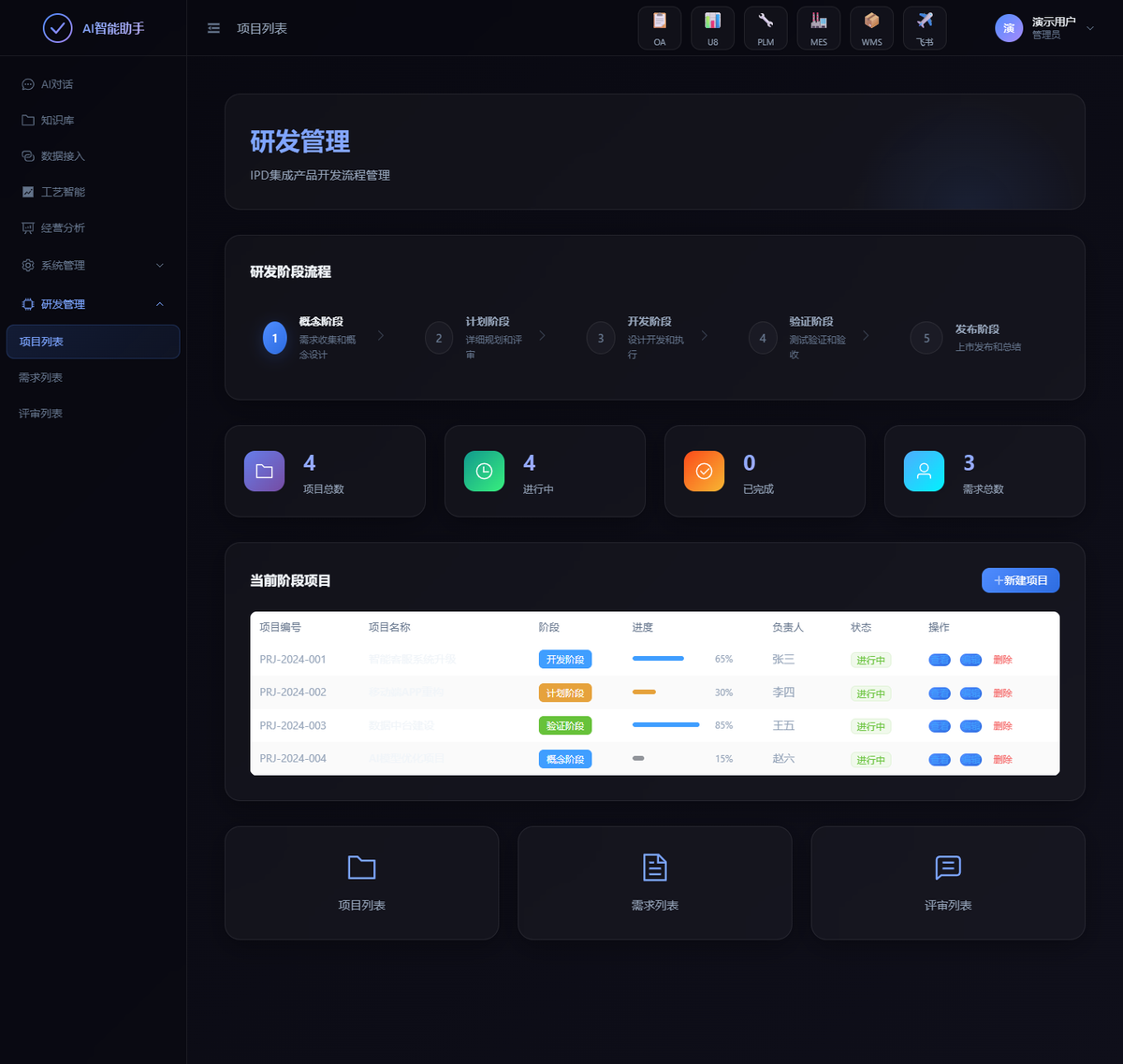
Covers IPD stage workflows, project / requirement / review records, plus user, role, department and permission settings for day-to-day administration.

IPD WorkflowProjects & ReviewsRole Permissions
INTERFACE

Platform Interface

Sample screens of the platform modules, grouped for easy browsing.
Platform Entry AI Chat Knowledge & Data Process & Analytics R&D Management
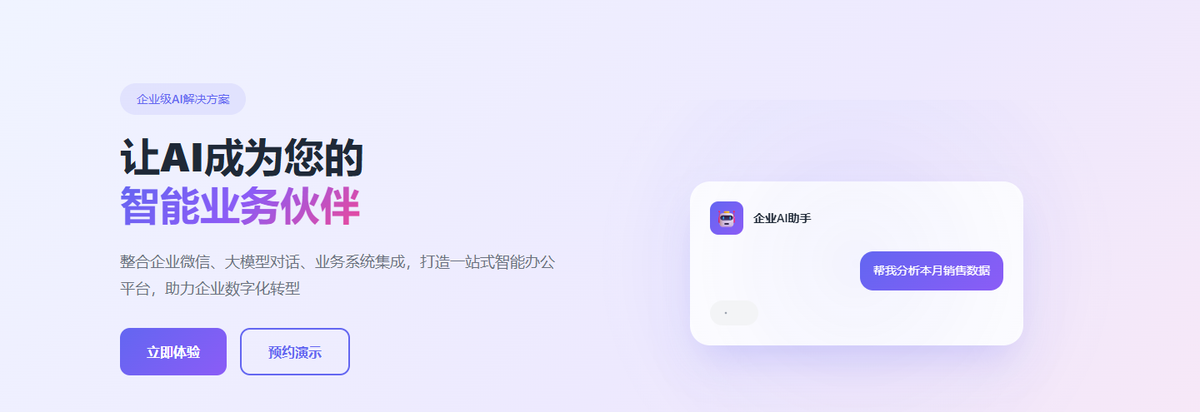
Platform Home
Enterprise AI Assistant Platform home, showing the unified chat entry and demo booking
Platform Home — Product overview and the unified chat entry point.
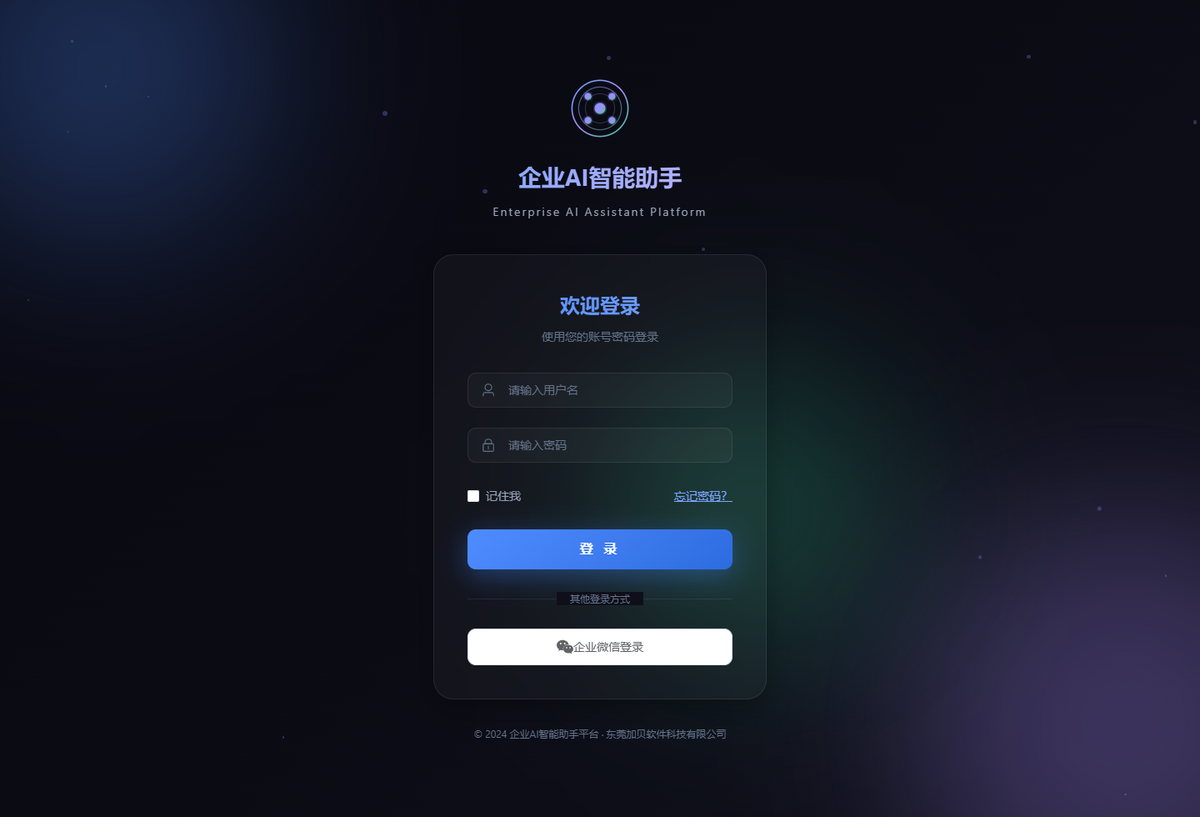
Sign-in Page
Enterprise AI Assistant Platform sign-in page, supporting password and WeCom sign-in
Account Sign-in — Supports password and WeCom sign-in.
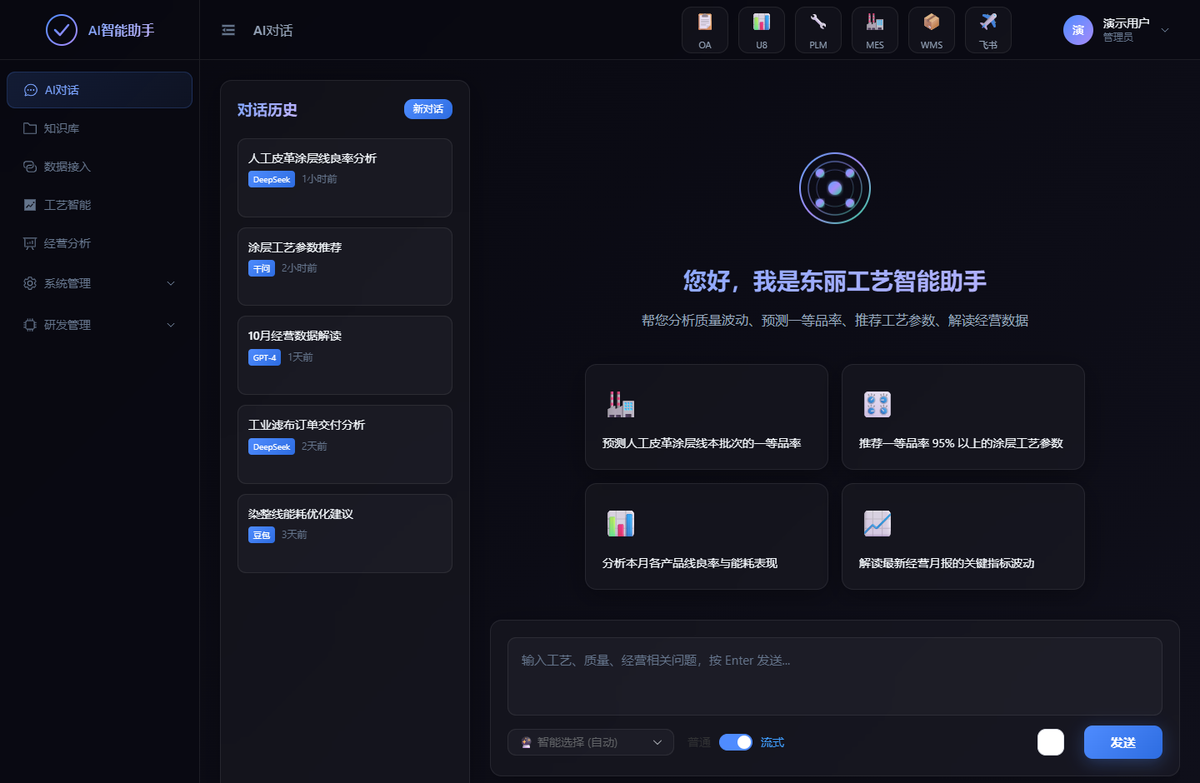
AI Chat
AI chat interface, with chat history on the left and suggested questions and input on the right
AI Chat — Chat history and the active model on the left; suggested questions, model selection and streaming answers on the right.
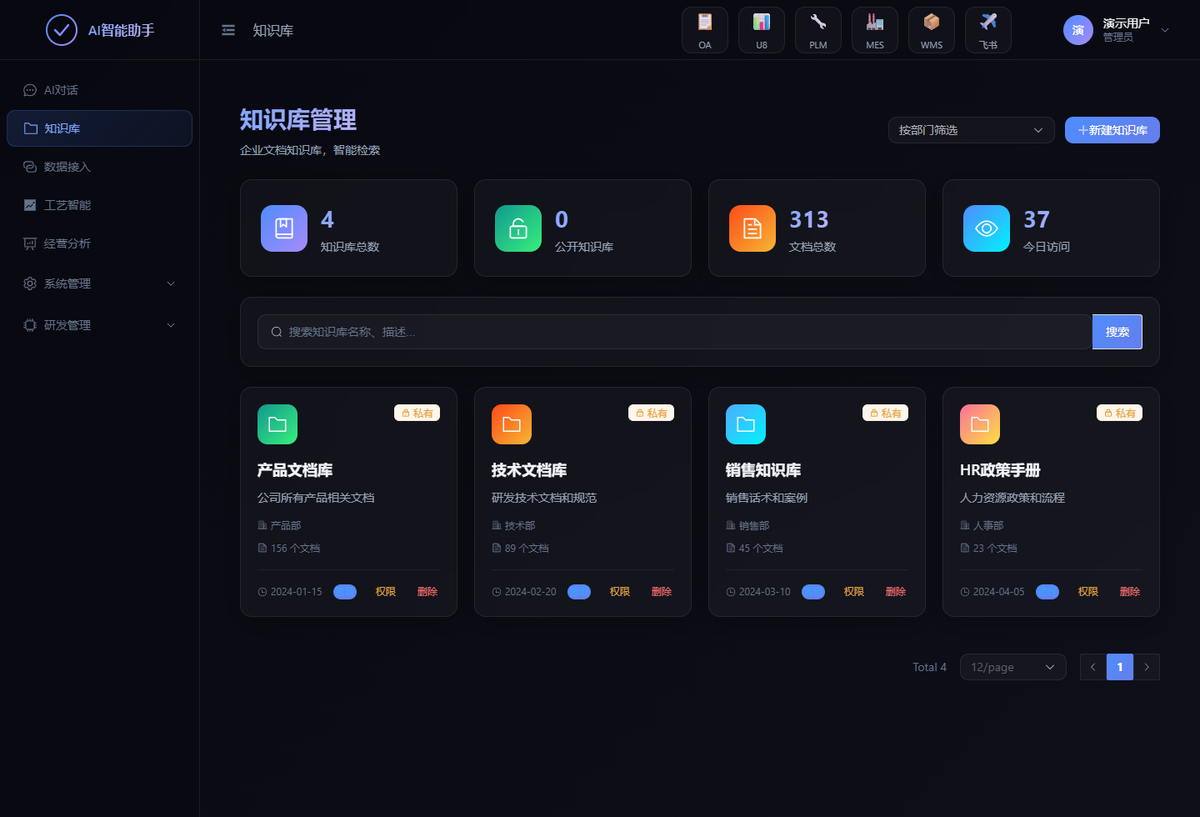
Knowledge Base
Knowledge base management, showing knowledge base count, total documents and department-based collections
Knowledge Base — Knowledge bases maintained by department, with document counts, visibility and access permissions.
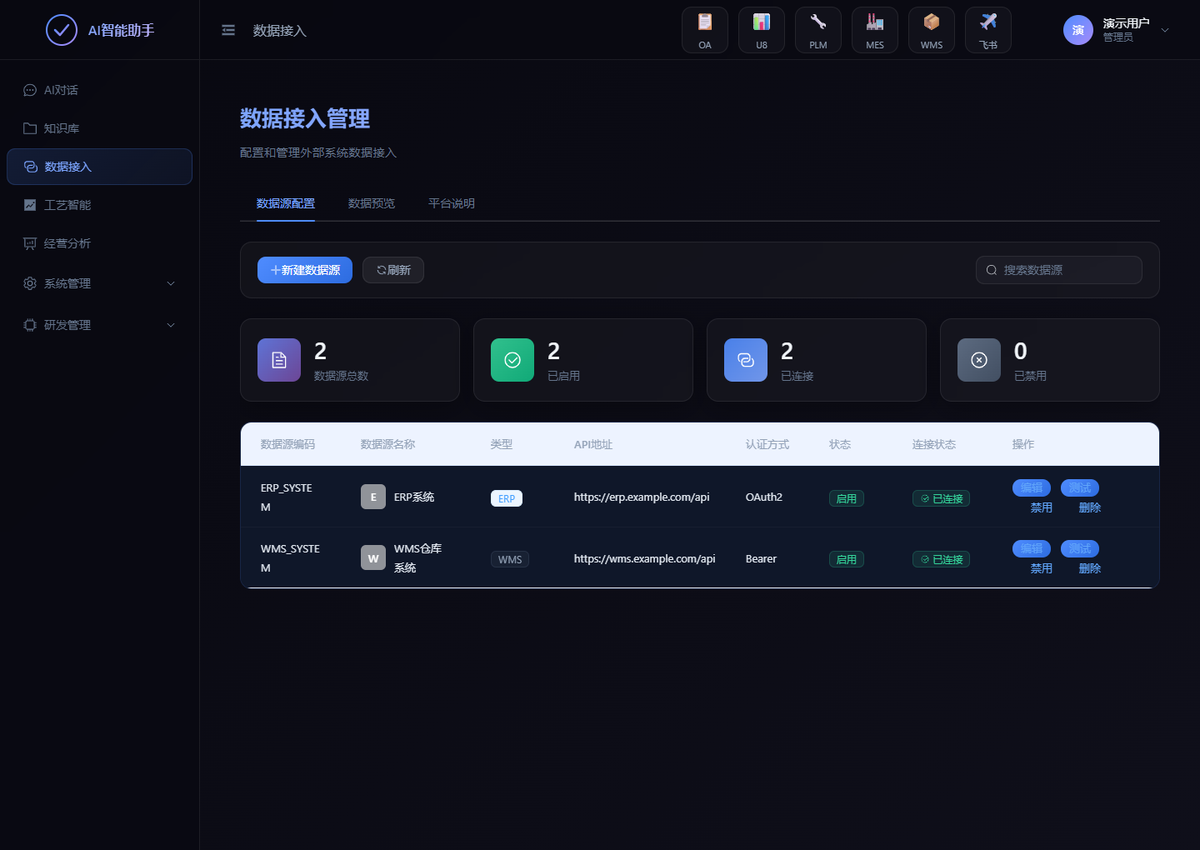
Data Integration
Data source management, showing source configuration, type, API endpoint and authentication
Data Integration — Configure source code, type, API endpoint and authentication, with connection status tracking.
Process Intelligence
Process intelligence, with quality prediction inputs above and parameter recommendation weights below
Process Intelligence — Enter process parameters for quality prediction and get recommendations weighted to your goals.
Business Analytics Dashboard
Business analytics dashboard, showing key metric cards, revenue and profit trends, regional distribution and live monitoring
Business Analytics — Key metrics, trend and distribution charts, with AI insight prompts and a live monitoring area.
R&D Management · Projects
R&D management, showing the five IPD stages, project statistics and the current-stage project list
R&D Management — Projects organized by concept, plan, development, validation and release, linked to requirements and reviews.

Screenshots are from a demo environment. Figures, names and statistics are sample data and do not reflect actual operations. The Administration module covers users, role permissions and departments, not shown individually here.

ARCHITECTURE

Business and AI layers for easier maintenance

Business systems and AI capabilities communicate through APIs; models and knowledge bases can be adjusted on demand, with minimal intrusion into existing systems.

Access LayerACCESS
Desktop BrowserMobile ResponsiveWeCom EntryUnified Sign-in
Business LayerJAVA · SPRING BOOT
Users & OrganizationRoles & PermissionsSSO IntegrationAPI GatewayLogging & Audit
AI LayerPYTHON AI SERVICE
Model RoutingDocument ParsingChunking & VectorizationRAG Retrieval
Data LayerDATA
Business DatabaseKnowledge DocumentsVector IndexChat & Activity Logs
External SystemsINTEGRATION
OAU8PLMMESWMSERPFeishu
Accounts, role-based access and activity auditing span all layers
ROADMAP

Delivered in three stages

Start with identity and chat, then add data and knowledge, then extend to specific business scenarios. The pace can be adjusted to your current setup.

01

Identity & Chat Foundation

Set up platform accounts and a unified AI chat entry so employees can get started in one interface.

  • WeCom org structure, users / roles / departments
  • JWT authentication and API permission checks
  • Multi-model chat, chat history and streaming responses
  • Unified system entry points and SSO configuration
02

Data Integration & Private Knowledge

Turn content scattered across systems and documents into searchable, citable data assets.

  • Connect ERP, WMS and other sources with status tracking
  • Multi-format parsing, chunking and vectorization
  • Tiered knowledge permissions and department visibility
  • Knowledge-base retrieval-augmented Q&A
03

Business Scenario Intelligence

Build on existing data and permissions to extend into analytics, process and R&D scenarios.

  • Digital employee skills and task logs
  • IPD projects, requirements and reviews
  • Analytics dashboards and metric commentary
  • Process quality prediction and parameter recommendations

Stage features can be combined to fit your existing systems and data foundation. Scope, timeline and acceptance criteria are subject to the agreed project assessment.

SECURITY

Permissions follow your organization

The platform bases permissions on your existing organization structure so data visibility matches job responsibilities.

IDENTITY

Unified Identity

Password and WeCom sign-in, JWT sessions and permission checks at the API layer.

ORGANIZATION

Organization & Roles

Users, roles and departments are maintained hierarchically; org changes are reflected in permission settings.

DATA SCOPE

Role-based Data Access

Knowledge and business data visibility is set by department and role; chat results are filtered by the current account's permissions.

DEPLOYMENT

Deployment & Compliance

Private deployment or data masking can be assessed based on data sensitivity, with activity logs retained for audit.

iNotes on Results & Usage Tips

  • LLM-generated content may be inaccurate or incomplete. For external replies, financial data or contract text, keep a human review step.
  • Quality predictions and parameter recommendations depend on historical data quality, sample coverage and site conditions. Use them together with process experience rather than as a sole basis for production decisions.
  • Screenshots on this page are from a demo environment; figures, names and statistics are sample data and do not reflect actual operations.
  • Follow applicable data compliance requirements for personal information and sensitive business data; use private deployment or data masking where needed.
  • This page describes platform capabilities and is not a commitment to specific outcomes. Scope, timeline and acceptance criteria are subject to the agreed project assessment.

Want to see how this platform fits your existing systems?

Tell us about your current systems, data and permissions, and we'll provide an initial assessment.

Chat Now